

Comments are a very important part and a way to increase engagement with your site. Some sites allow auto commenting and some sites don’t allow both have their own views about it. How to automatically enable comment approval in WordPress?
What are WordPress Comments?
In WordPress, a comment is a message left by a reader or visitor on a blog post or page. Comments allow readers to engage with the content on a WordPress site, and can be a useful way for a site owner to gauge reader responses and collect feedback.
When a reader leaves a comment on a WordPress site, it is added to the comments section at the bottom of the post or page. Site owners can moderate comments, approving or deleting them as necessary, and also allowing readers to reply to comments, creating a threaded conversation.
What are the benefits of commenting on the site?
There are many benefits to allowing comments on a website:
- Increased Engagement: Comments allow readers to engage with the content on the site and share their thoughts and opinions. This can create a sense of community and encourage readers to return to the site in the future.
- Feedback: Comments provide a way for readers to respond to content on the site. This can help the site owner understand what readers like or dislike about the content, and make improvements accordingly.
- Search Engine Optimization (SEO): Fresh, unique, and high-quality content can help improve a site’s search engine rankings. Allowing comments can encourage readers to add their thoughts and ideas to a post, which can help increase the overall word count and add new content to the site.
- Social Proof: Comments can serve as social proof, showing other readers that the content on the site is valuable and worth reading. This can help increase the credibility and authority of the site.
- Increased exposure: Allowing comments on a site can help increase the site’s visibility on the web. When readers leave comments, it can generate more links to the site, which can help improve the site’s search engine rankings.
Why we allow WordPress to automatically approve comments
There are a few reasons why you might want to allow WordPress to automatically approve comments:
- Save time: Moderating comments can be a time consuming process, especially if you receive a large amount of comments on your site. Allowing WordPress to automatically approve comments from trusted commenters can save you time and allow you to focus on other tasks.
- To encourage engagement: Allowing comments to be automatically approved can encourage readers to leave comments, as they’ll see their comments appear on the site more quickly. This can increase reader engagement and helps create a sense of community on your site.
- To reduce spam: By automatically approving comments from trusted commenters, you can help reduce the amount of spam comments you need to deal with. You can also use a plugin like Akismet to help filter out spam comments.
- To keep the conversation flowing: If you receive a lot of comments on your site, allowing comments to be automatically approved can help keep the conversation flowing and prevent delays in the approval process.
However, it’s important to note that you should still regularly check your comments to make sure they meet your site’s guidelines and are appropriate for your audience.
Why don’t we allow WordPress to automatically approve comments
There are a few reasons why you might not want to allow WordPress to automatically approve comments:
- How to Maintain Control: By manually approving comments, you can have more control over the content that appears on your site. This can be especially important if you have a high-profile website or if you are concerned about maintaining a certain image or tone on your site.
- To prevent spam: While using a plugin like Akismet can help filter out spam comments, manually approving comments can give you an extra level of control over the comments that appear on your site.
- To ensure quality: Manually approving comments allows you to ensure that comments on your site are of high quality and add value to the conversation. This can help create a more positive user experience for your readers.
- To protect sensitive content: If your site discusses sensitive topics, manually approving comments can be a good way to ensure that inappropriate or offensive comments don’t appear on your site.
How to Automatically Approve Comments in WordPress?
To automatically approve comments in WordPress, you can follow these steps:
- Log in to your WordPress Dashboard.
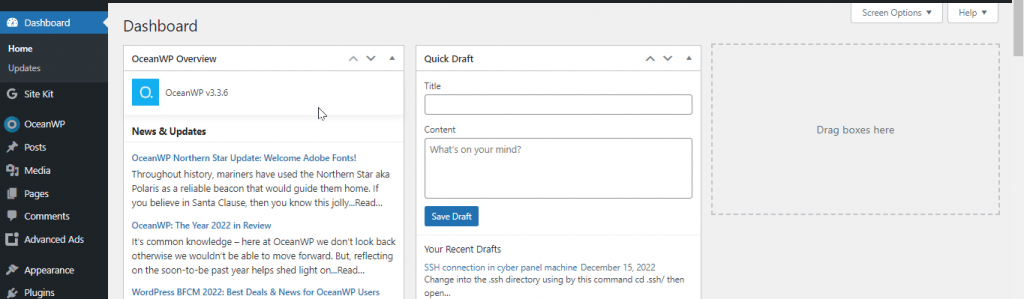
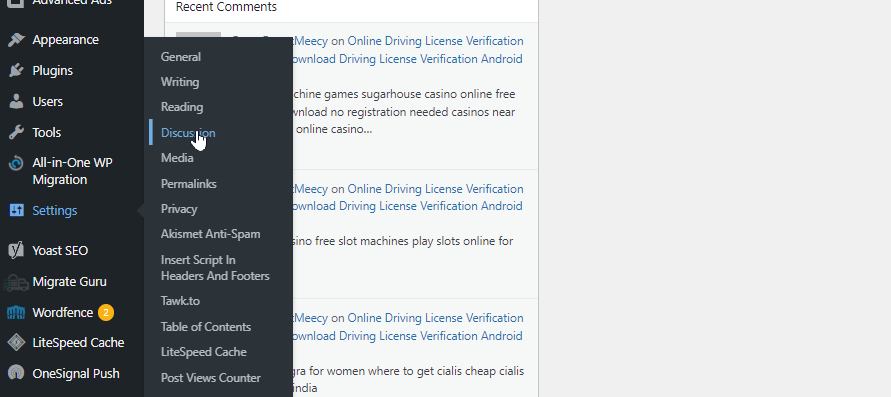
- Click on the “Settings” option in the left-hand menu.

- Click on the “Discussion” submenu item.
- Scroll down to the “Before comments appear” section.

- Under “Comment moderation,” uncheck the box next to “An admin must always approve comments.”

- Scroll down and click on the “Save Changes” button.

With these settings, comments from trusted commenters will automatically be approved, while comments from new commenters will be held for moderation. You can also use plugins like “Akismet” to automatically filter spam comments.
