
When you want to do some work with WordPress then the first step is to write blog posts in WordPress. Getting started writing posts in WordPress is a very easy process. In this article I am going to tell you how you can write posts in WordPress.
When a new person starts a new blog or any other type of site using WordPress. So you must have knowledge about creating and managing posts with WordPress. This is one of the core and basic requirements of WordPress.
So before doing anything else in WordPress you just need to know how to create a blog in WordPress. As blog or post always have great impact on site ranking, site SEO and all.
Login to your WordPress:
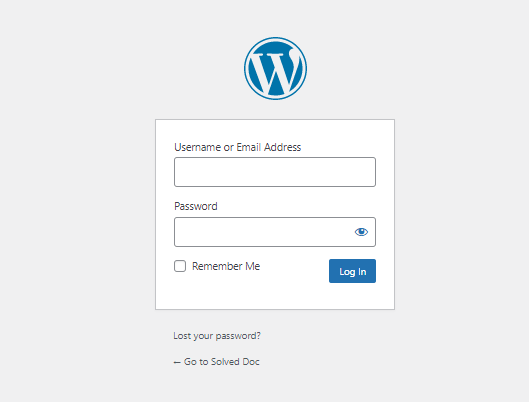
First of all, you need to log in to your WordPress admin dashboard. Normally your WordPress admin dashboard access is on:
https://www.yourwebsit.com/wp-admin
If you have any custom login link for WordPress admin dashboard then you can go to that and provide username and password to log in.
Create a post in WordPress:
Once logged in, you can see a lot of options in the menu on the left side of the WordPress dashboard.
go to Post-> Add New Post option in the left menu.
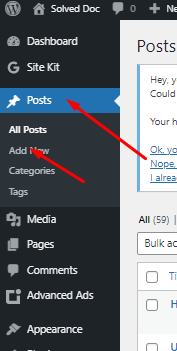
Once you click there it will redirect you to the posting page where you can write the post as per your choice and content.
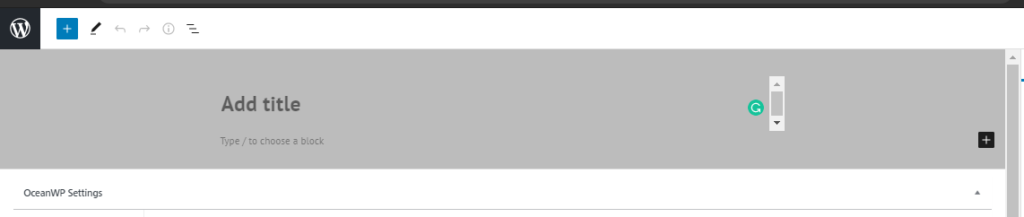
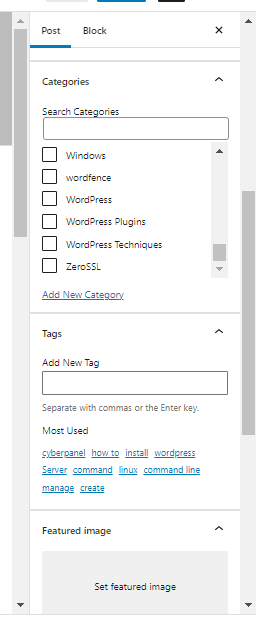
On this page, you can write the content as on the main page, and on the right side, you can see a lot of options such as some important Categories, Tags, Featured Images in the Posts tab.
You can add categories, tags to your posts, and also set featured images in your posts.
Save Post:
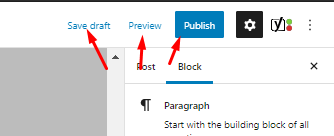
You can also draft posts in WordPress and publish them in one go.
But as you know a post needs multiple reviews so you have to save it in draft and maybe you have to preview it multiple times and finally, you can publish a post with zero error. So all these buttons and options are present on the top of the site right on the posting page.