


Creating a post in WordPress is the first and initial step in blogging and even in all fields if you want to start a blogging website then this will be the first thing you need to do. However, creating a post in WordPress is a very easy and step-by-step process.
To create a post in WordPress the user must follow these steps:
Step 1:login site”wordpress dashboard,
Step 2: Click on the Post icon on the left side display in the navigation menu.
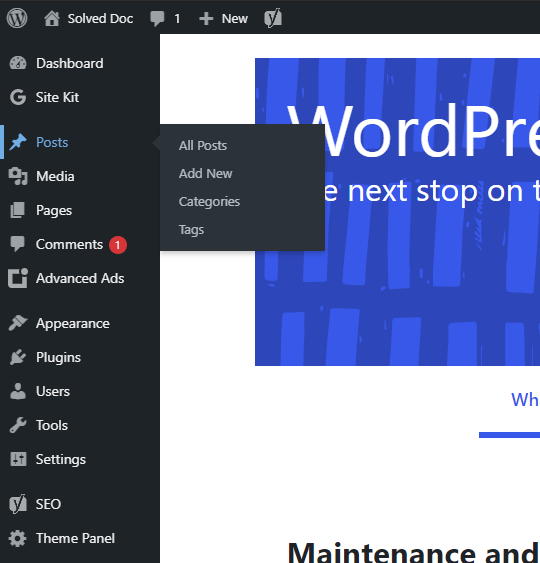
Step 3: Four options will appear. then user click add new button On the Posts page to create a new post.

step 4: Enter a title in the title bar. It will appear at the top of the post.
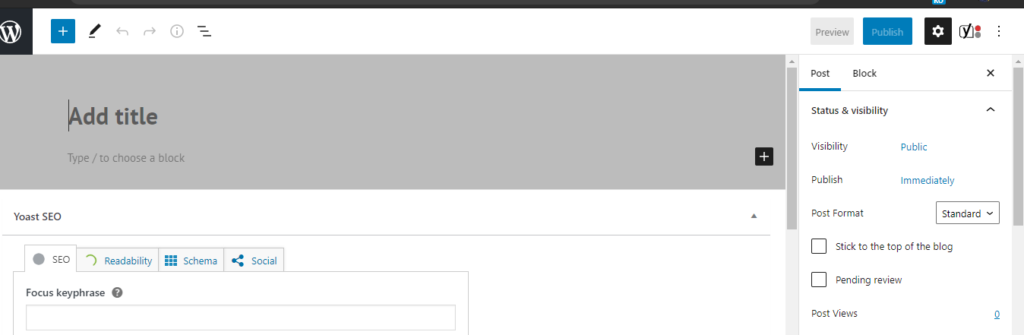
step 5: After giving the title, type the content in the content bar. Users can format the text of the content using an editor, like users can make italic bold and can also change the colors of the text.
Step 6: User can also add picture. User can add an image with the help of “Add Media Button”.
Step 7: When the user has entered the information in the posting then the user can click on the publish button. The post is then displayed on our website.
step 8: If the user does not want to publish his post publicly then the user can also click on Save Draft to save the informa
